

loading

BLOG

How to Choose the Best Fanless PC for Your Needs

A Fanless Pc can keep a workspace quiet, reduce moving parts, and fit neatly beside equipment on a crowded bench. But “fanless” does not mean cool under every workload. Heat still needs somewhere to go. A compact metal case, warm room, or tightly packed cabinet can change how reliably a system performs.

This guide uses a clearly identified composite expert voice, Alex Morgan, to frame the central decision: “Choose a Fanless Pc for its real workload and thermal limits, not its spec-sheet headline.” That is an editorial quotation, not a verified statement from a real industry professional. The practical point remains important. A PC running digital signage has different needs from one logging sensor data or controlling machinery. Processor speed is only part of the choice.

We will look at workload, processor performance, cooling design, ports, storage, mounting, and operating conditions. You will also see why fanless systems need careful attention to temperature and airflow around the enclosure. Small details matter. A blocked vent or a sunlit cabinet can create trouble. Price matters, too, though the cheapest unit may not suit continuous operation. Some specifications are easy to compare; real-world reliability is harder to predict. That uncertainty deserves a second look. The right choice balances performance, durability, connectivity, and the conditions where the computer will actually run.
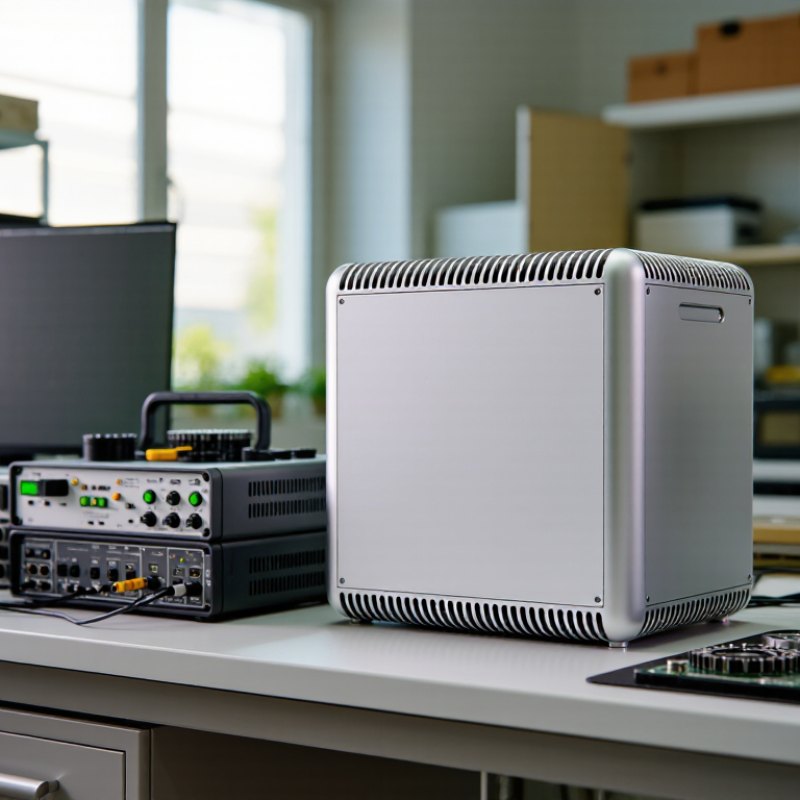
How to Choose the Best Fanless PC for Your Needs

Define Your Workload and Operating Requirements

How to Choose the Best Fanless PC for Your Needs

Define Your Workload and Operating Requirements

Start with the work the computer must do every day. A unit handling spreadsheets, digital signage, or basic data collection has different needs from one processing video or running several virtual machines. Note your typical and peak workload, not just the minimum. A processor that looks adequate on paper may slow down during sustained heavy tasks. Heat has limits. In a fanless case, prolonged high loads can lead to reduced performance, so check thermal specifications and independent testing when available.

Tips: List required applications, memory, storage, and ports before comparing models. Include the cables and peripherals you actually use. A spare port can save hassle later.

Next, define where and how the PC will operate. Record the ambient temperature range, available space, mounting position, and exposure to dust or vibration. A sealed design may suit a dusty workshop, while a cramped cabinet can trap heat around the case. Confirm that the operating system and drivers support your software and connected devices. Check power input, network needs, and remote-management requirements too. I would leave room for growth, but not overspend on capacity that your workload will never use. Requirements change; a neat specification sheet cannot predict every awkward edge case.

Assess the Fanless PC’s Processor, Memory, and Storage

A fanless PC’s processor should match the work it will actually perform, not just look impressive on a specification sheet. A small office terminal may run smoothly with a modest processor, while image analysis or several virtual machines need more sustained capacity. Check independent performance tests that resemble your workload. Pay attention to sustained speeds, because a sealed enclosure has limited ways to shed heat. Peak clock figures alone can mislead.

Memory affects how comfortably the system handles several tasks at once. For basic browsing and document work, moderate capacity may be enough; large datasets and many open applications need more. Check whether memory is replaceable or soldered before buying. That detail is easy to miss. Leave some room for growth, but avoid paying for capacity your software will never use.

Storage deserves the same practical check. A fast solid-state drive can shorten startup and file-loading times, but capacity matters if the PC keeps local video, project files, or system logs. Review the drive interface, upgrade options, and expected write workload. On paper, the choice looks tidy; real workloads are messier. Compare processor, memory, and storage as a set, then test the configuration under the longest task you expect it to handle.

Check Connectivity, Expansion, and Compatibility

A fanless PC should match the devices it will serve, not just the workload on its processor. Count the ports you need, including USB, Ethernet, display outputs, and serial connections. A digital-signage setup may need two displays, while a workshop controller might rely on serial equipment. Check each port’s version and speed, since identical connectors can behave differently. Bandwidth matters.

Expansion can be limited by a small, sealed chassis. Check whether the system supports an M.2 drive, a wireless module, or a low-profile expansion card. Note the card’s dimensions and power requirements before buying; a slot alone does not guarantee a physical fit. In practical use, extra slots can be useful, but they may add heat inside a passively cooled enclosure. More is not always better.

Compatibility starts with the operating system and its available drivers. Confirm support for your software, network adapters, storage interface, and display resolution. If you plan to connect older equipment, verify its interface and required voltage rather than relying on an adapter guess. It is easy to overvalue a long port list and miss one essential connection. Test the actual configuration when possible. Small details count.

Evaluate Cooling Design, Durability, and Noise-Free Operation

How to Choose the Best Fanless PC for Your Needs

Evaluate Cooling Design, Durability, and Noise-Free Operation

A fanless PC depends on its case to move heat away from the processor. Look for a metal chassis with broad, exposed surfaces and clear ventilation guidance. Check the operating temperature range against your actual setting, especially near sunlit windows, ovens, or other warm equipment. A compact case may fit neatly on a desk, but limited surface area can make heat harder to dissipate. Quiet operation has a physical cost.

Durability matters when the computer will run for long periods or sit in a dusty workspace. Check whether ports feel secure and whether the enclosure protects internal components from dust and vibration. Review the manufacturer’s stated limits for temperature, mounting position, and workload; these details are more useful than vague claims of ruggedness. Fanless does not mean maintenance-free. Dust can still collect on the case and block heat transfer. The trade-off can be frustrating: a system may stay silent but slow down under sustained heavy workloads. That possibility is easy to overlook.

Tips: Keep space around the chassis. Avoid enclosing it in a cabinet. Check its surface temperature during normal use, and leave room for airflow. If it runs unusually hot, reassess its placement and workload.

Compare Total Cost, Warranty, and Long-Term Support

How to Choose the Best Fanless PC for Your Needs
Compare Total Cost, Warranty, and Long-Term Support

When comparing fanless PCs, look beyond the purchase price. A low-cost unit may need extra mounting hardware, storage, or a power adapter. Add those items, expected energy use, and installation labor to your estimate. That matters. For equipment running all day, even a small energy difference can accumulate over several years. Ask for the exact configuration and calculate costs over its planned service life, not just the first invoice.

Warranty terms deserve close reading. Check how long coverage lasts, which failures are included, and who pays shipping. Read the exclusions. A warranty may not cover damage from dust buildup, vibration, or operation outside stated temperatures. Ask how quickly replacement units are typically dispatched. A spare computer can cost less than downtime in a kiosk, workshop, or control room. Still, spares tie up money, so compare both options.

Long-term support is less visible, but it can determine whether a system remains useful. Confirm how long replacement parts, firmware updates, and technical assistance will be available. Ask whether storage and memory can be replaced without specialized tools. Plan for change. Today’s suitable configuration may struggle as software grows heavier. Support promises can be vague; request written timelines and response targets. Even then, plans change, and estimates may prove optimistic. Keep configuration details and support contacts with maintenance records.

Chat Online
Chat Online
Leave Your Message inputting...
Thank you for your attention. Please kindly describe your question first, or please send your inquiry to our email sale@pcbledmodule.com, and we will reply to you ASAP. Welcome, what can I help you?
Sign in with: